The operating system for growing commercial GCs
RFIs, submittals, change
orders, pay apps — drafted for you.
16 AI agents do the paperwork; you approve it. Nothing reaches an owner, architect, or sub until a human presses send. And it is one system for every job you are running, precon to closeout: drawings and takeoff, AIA billing, the field, and your portals across 43 modules, with project-level roles for each seat in the office and no license stack to assemble.
Blueprint · takeoff engine
The drawing is live.
An in-app PDF viewer with real measurement tools — built in, no Bluebeam seat to buy. Calibrate against one printed dimension, then measure linear, area, perimeter, and volume. The same wall reads the same real length at any zoom, at any window size, and on a sheet that was drawn sideways.
- No default scale, ever. When we can read the scale off the sheet, we show it and where we read it, and the measure tools stay off until you confirm it. No scale on the sheet? You set one. Paste markups onto an uncalibrated page and the numbers are stripped — geometry only, and we name the pages
- Reviewed symbol matching. Box one symbol, inspect the candidate matches, then confirm or correct the count
- Push to SOV. Approved quantities land in your Schedule of Values as measured lines you price
- Region → RFI. Crop a callout and it becomes the attachment on a new RFI or punch item
Money · AIA billing
Pay apps built from your schedule of values.
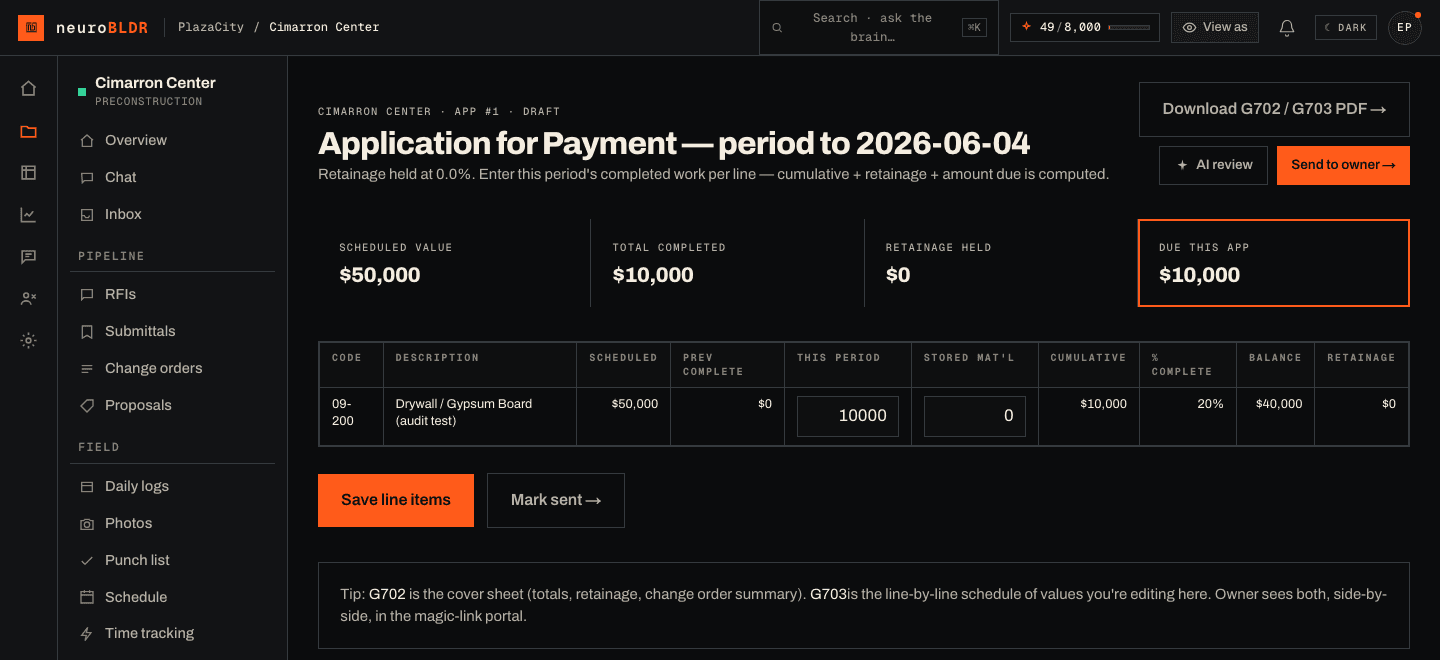
AIA-format G702/G703 applications, built from your schedule of values and percent-complete. Every figure is integer cents, never a float. Our own layout in the G702/G703 format, not the official AIA document.
- The waiver gate refuses. A draw can't be marked paid while a sub billed this period has no signed waiver on file — the server returns the gap list, not a warning badge. Turn on two-person release and whoever requested the payment can't confirm it
- Client magic-link. Owner and architect review and approve from a project-scoped link — no account, no paid seat. An approval is a recorded decision against the record, not a signature image
- Anomaly detection. Backward draws, big jumps, schedule mismatches — caught early
AI · 16 agents
The paperwork drafts itself.
A rough note can become an RFI, a priced change-order draft, or a structured daily log. Source context stays attached when the workflow starts from a document or drawing region.
- Draft, don't send. There is no autonomous outbound path to an owner, architect, or sub — we never built one. A human presses send
- Source-aware. Document- and region-based workflows preserve the source context you supplied
- Across the workflow. RFIs, change orders, submittals, billing, schedule, closeout
“lintel at grid line 4 conflicts with the beam schedule — need the architect to confirm size before we frame”
Lintel size at grid line 4 — conflict with beam schedule
Routed to architect · +7-day chase queued · cost & schedule impact linked
Two guarantees
AI you can hand to the whole job.
The two questions a GC's owner and controller ask before putting AI anywhere near an owner or a sub. Both are answered in the code, not the marketing — they are enforced defaults, not settings someone has to remember.
- 01
The per-project money firewall.
Free field seats never see a dollar figure.
Hand out free field logins and they get drawings, hours, quantities, and the schedule — and zero pricing, because a free field seat is denied at the top of the check no matter how the rest is configured. A field seat you choose to pay for is the one exception, and it is still yours to set: it reads a register's quantities by default, and dollars only when you grant that class dollars. Office roles are yours to set the same way: superintendents and foremen default to zero dollars, and contract sum, sub pricing, and margin are released per project and per person only when you decide to. You stop keeping a second, quieter system just to hide the money.
- 02
Draft-only, by construction.
The AI never emails your owner behind your back.
Every agent writes a draft. An RFI, a change order, a submittal transmittal, the pay app check, a chase-up — all of it lands in your queue in draft or approval-required state, and a human presses send. There is no autonomous outbound path to an owner, architect, or sub to switch off, because we never built one. And the agents are part of the seat: there is no separate AI licence to buy and no per-draft charge, just a monthly allowance each billed seat brings that pools across the workspace — and if an office runs out mid-month, an owner or admin tops it up by one seat-month, which is the only thing there has ever been to buy.
The back half of the job
Everything after the pay app.
Takeoff and billing are the half a demo shows you. The half that decides whether you keep using it is the month-end schedule, the file your accountant needs, the RFI nobody had to chase, and a closeout that does not turn into three weeks of folder archaeology.
- 01
WIP, and a month that stays closed
The schedule your surety asks for, across every job.
Revised contract, cost to date, percent complete, revenue earned, and the over- and under-billing split — for the whole portfolio, as a report and as a CSV. Close a month and it is frozen: the schedule is written once and read back from that record, so a cost backdated into a closed month cannot change what that month reports. Ask for a month that was never frozen and you get nothing rather than a number recomputed from today, because that is the restatement freezing exists to prevent.
- 02
The accounting hand-off
A file your bookkeeper can post.
The keyed accounting export is one row per job, cost code, cost type, period, vendor and reference — integer cents, ISO dates, a stable row key, and re-runs that come back byte-identical so a second import matches instead of doubling. Every exclusion is counted on the file rather than quietly dropped. Connect QuickBooks Online as well and approved vendor bills and pay-app invoices go across, pulling payment status back; map your cost codes to accounts once and the mapping is what the push uses.
- 03
The inbox is part of the workflow
The architect answers by email, and one approval records it.
When the reply came from the address the RFI was routed to and the classifier is confident about what it is reading, it is matched to the open RFI and proposed in the project's Approvals queue. Nothing from the email reaches the RFI until someone in the office who can see the project's full financials approves it; then the answer is recorded under their name and the status moves to answered. The proposal says whether the email carried a valid DKIM signature from the sender's own mail domain, which we verify ourselves. Anything else sits in the inbox for a person, which is the correct outcome for a forwarded thread or a message from an address nobody recognizes. Nobody needs an account to answer you.
- 04
Closeout
The binder is assembled from the record you already kept.
Current drawings at their latest revision, warranty documents and O&M manuals, the final signed lien waivers, the final punch report and the last pay application — collected into a cover index and the documents behind it. You are not rebuilding the job from folders at the end; you are printing what the project already contains.
Everything else
43 modules in one place.
Every module shares the same data — a takeoff feeds the budget, the budget feeds the pay app, the pay app gates the lien waiver. Nothing gets re-keyed between tools.
Preconstruction
6 modules
Bid pipeline
Lead → qualified → site visit → proposal sent → won. Forecast + win-rate roll up by quarter.
Takeoff
Confirm or calibrate scale · measure line / area / perimeter / volume · review candidate symbol matches · ×N typicals. There is no default scale anywhere: with no calibration the measure tools stay disabled, and markups pasted onto an uncalibrated page keep their geometry and lose their numbers. Approved quantities feed the estimate + budget.
Estimator
Drafts an SOV from a scope description using your prior project actuals via Company Brain.
Proposals
Branded proposal builder — line items by cost code, sub-attributed pricing, and owner review / acceptance by link.
Buyout
A buyout log for each project: one package per trade with the bids you received, their inclusions and exclusions, whether each sub's COI is current and their W-9 is on file, and the award. The scope coverage matrix puts each spec section against the subs who own it and marks it a gap, covered, or an overlap where two subs both think the work is theirs.
Materials catalog
Per-workspace catalog grows from POs and quotes. Last-paid price drives proposal auto-fill and budget protection.
Documents & comms
7 modules
Documents + drawings
Drawing register with revision pinning. PDF viewer in-app, no Bluebeam license required. Issue a transmittal and the sheet list freezes at the sheet numbers and revisions you sent, with one acknowledgment row per recipient sub — signed in their own portal, under their own name. Nobody is marked as having received anything: unacknowledged stays visible as a chase, never an assumption.
RFIs
Log, route, track. Linked to drawings and cost / schedule impact. RFI Agent drafts. When an answer is recorded, neuro reads it for added scope. If it finds some, it quotes the sentence, and the PM gets a task with a drafted change order title and description and a reminder date. The reminder is neuroBLDR's default, not your contract's notice period, and the PM writes the change order.
Submittals
Spec section, route, return — with the architect's four stamps kept apart (approved, approved as noted, revise & resubmit, rejected) instead of collapsed into two. Resubmitting starts revision+1 as its own row pointing at the round it answers, so the returned record survives verbatim. Give a sheet a new revision and approvals reviewed against the superseded sheet are stamped stale with the reason; clearing that is a human re-review, and nothing auto-resubmits. Submittal Agent drafts the transmittal and the +7-day chase. Record the date the material has to be on site and the supplier's lead time, and the register shows the date the submittal has to be approved by.
Spec book
Upload the project manual and neuroBLDR reads each section's submittals article into proposed submittal log rows, each cited to its page. You tick the rows you want and they're created as draft submittals. A page it can't read is named in the results.
Substitutions
A sub proposes an or-equal product against a spec section from their portal, with their own cost and schedule difference. You approve or reject it, and a rejection carries the reason the sub reads in their portal.
Change orders
RFI → COR → CO chain. CO Agent prices the scope, owner approves via magic-link. Both ends of the chain are records too: a sub submits a change request from their portal with their own price, accepting it opens the GC-side change order already linked to it, and you flow an executed owner change order down as an explicit subcontract change order — priced for that sub by the person doing it, never copied from the owner's number — which the sub then acknowledges or disputes. The flow-down refuses while the owner change order is unexecuted. The owner can ask for a change from their portal in their own words, and the request lands with your team to price.
Inbox
Gmail or Outlook connected. Inbox Classifier routes incoming threads to the right project.
Field operations
9 modules
Daily logs
PWA + offline. Daily Log Agent turns a 30-second voice note into a structured log with deliveries and blockers.
Photos
Geotagged and area-tagged. Photo Auto-Tagger (vision) flags safety violations.
Schedule
Timeline of planned dates plus a 3-week lookahead; milestones are yours to tick and nothing computes a critical path. Schedule Watch flags slip and names a recovery move.
Time sheets
Workspace-wide weekly view by worker. Burdened cost calc. CSV export for payroll.
Punch list
Room or area tagged, photo-attached, sub-assigned. Status timeline. Paste the architect's, the owner's or the MEP engineer's list, one item per line, and each imported item keeps whose list it came from.
Field observations
Log an architect's or engineer's site visit with its date, the observer and a summary, and the deficiencies they noted become punch items linked back to it.
T&M tickets
Extra work recorded the day it happens: who directed it, when and how, the hours by worker, materials and equipment, and photos. The ticket holds quantities, not prices, and the client can acknowledge it on site with their signature. One click turns it into a draft change order with no price, and the estimator types the price.
Safety
Toolbox talks by topic and date, with a sign-in sheet attendees sign on a phone or tablet, or on paper. Job hazard analyses with an approval step, incident reports with a printable incident log for the project, stop-work orders that stay open until someone resolves them, and permits with their type and expiry date.
Contract time
A delay ledger against the contract's substantial completion date. Each delay event records the days claimed, only an owner-approved extension moves the adjusted date, and pending claims show as at risk. With a daily liquidated damages rate on the contract, the page shows the LD exposure for the days behind. Inspections are logged on the same page, and neuro drafts a time-impact narrative for a delay event for the PM to review.
Money & billing
12 modules
Budget + SOV
Schedule of values, cost codes, contract sum, retainage percent.
Cost codes
Cost-code backbone — master + per-project tree binds takeoff, SOV, POs, bills, and labor to one structure.
Job P&L / WIP
Live job P&L — revised contract, cost-to-date, % complete, revenue earned, over / under-billing, cost-by-code variance. Committed cost counts issued purchase orders and open subcontracts by cost code. On a job with a cost budget, each cost code's estimate at completion is the largest of its budget, committed cost and cost to date. Margin fade compares each job with the last frozen month. When a job has no cost budget, its cost to complete is estimated as the contract sum less the cost to date, and the report flags it as an estimate.
Purchase orders
POs to vendors and subs by cost code — fractional quantities, delivery tracking, links to bills.
Backcharges
Bill a sub back for damage, rework or cleanup. Each backcharge moves from draft to sent to acknowledged or disputed to settled, and the sub acknowledges or disputes it in their own portal. It is tracked on its own and is never taken off the sub's pay automatically.
Allowances + contingency
Allowances and owner contingency each carry a budget, and every draw against them is recorded. The balance is worked out from the draws each time you look, never stored, so an overdraw shows up on the budget page.
Sub retainage releases
Release retainage to a sub as its own record on their subcontract, by percent and with a note. Releases on one subcontract can't add up to more than 100 percent of its retainage.
AIA pay apps
G702 / G703 in our own layout (not the official AIA document) — one calculation shared by the server, the save transaction and the live preview, in integer cents, so the cover can't disagree with its lines. Pay App Reviewer (anomaly detector). One-click send-to-owner via magic-link. Optional two-person release: the person who requests a payment can't confirm it.
Lien waivers
Conditional and unconditional, partial and final. Sub magic-link signing into a clean PDF. A draw can't be marked paid while a sub who billed this period has no signed waiver on file — the server refuses and returns the gap list; only an owner or admin can override.
Draw package
One project-month's draw in one downloadable PDF: the pay app, the lien waivers for that period and a financial recap, to hand to the lender or surety.
Accounts payable
Workspace-wide vendor bill queue. Aging buckets. Approve, dispute, mark paid (a record — neuroBLDR never moves money).
Cash flow forecast
Deterministic 13-week forecast — AP by recorded due date, AR at a stated Net assumption. Names the tightest week; refuses to spread undated bills.
Coordination & closeout
9 modules
Sub directory
COI, W-9, safety prequal. Expirations flagged. Cross-project conflict detector.
Meetings + minutes
The OAC ritual as a record. The agenda is assembled from the live registers — open RFIs with their aging and who is holding them, submittals still in review, change orders pending, open delay events — and frozen onto the meeting, so the numbers in the room are the numbers in the system and no model paraphrased them. Minutes are typed by a person; distributing them is a separate timestamp, because that is when they start standing as the record. Open items carry forward numbered with the meeting that raised them until somebody closes them.
Sub coordination
Subs file the daily report their subcontract already requires, from the portal they already have — one per sub per day. Then the cross-check nobody does by hand: their stated headcount against your own daily log's manpower for that date, reported as a disagreement rather than averaged away. Who owes a report is derived from who has an active subcontract and a live portal link, not from a list somebody keeps.
Owner + sub portals
Project-scoped magic-link access for pay-app review, CO approval, and lien-waiver signing. No paid seats required.
Warranty callbacks
Callbacks after turnover. The owner reports one from their portal or you log it, you assign it to a sub and schedule it, and it can't close without a closure note.
Owner report
Build the owner report when you want it, or turn on a weekly draft for every project not yet in closeout. It comes from the record: schedule progress, the period's photos, answered RFIs, deliveries and change orders, and what is coming up next. neuro drafts the summary at the top. A person reviews it and sends it, and it never goes to the owner on its own.
Portfolio dashboard
Workspace-wide rollup. Schedule health, money rollups, risk badges. The fleet view for 3+ projects.
Reports
Cross-project WIP, AR aging, schedule health, margin, contract value variance.
Closeout
Readiness checklist and on-demand binder PDF for warranties, O&M manuals, drawings, and final waivers.
Plus the AI agents, Blueprint takeoff, and client + sub portals from above — all in the same workspace. Agents that are plan-gated are labeled as such.
Trust & security
Built to be trusted with the whole job.
We're honest about where we are. Here is what protects your data today — alongside the draft-only guarantee above. neuroBLDR is not currently SOC 2 certified; a Type II audit remains a roadmap item.
- Workspace isolation
- Authenticated requests derive workspace and project scope from the signed-in user, and child record IDs are revalidated at the request boundary. External portal tokens are project-scoped and hashed at rest.
- Encrypted everywhere
- Traffic uses HTTPS, storage providers supply encryption at rest, and connected email and QuickBooks OAuth tokens are encrypted with AES-256-GCM before database storage.
- Time-bounded access
- Client, architect, and lender links expire in 90 days; sub links in 30. Every link tracks last-used and total uses, and can be revoked from the project's people page.
- Per-project money firewall
- Dollar visibility — contract sum, sub pricing, margin — is resolved per project and per person. Free field seats are denied at the top of the check and office viewers before any workspace override is read, so neither can be granted money by a misconfiguration. A field seat you pay for is a seat the owner can grant dollars to, for the whole class, in Settings — supers, foremen and estimators are granted separately, on the office money grid.
- Audit log
- Security-sensitive and core business mutations write workspace, actor, action, and target information to the audit trail. Audit export is available where the plan allows it.
- AI data boundaries
- neuroBLDR does not use customer project data to train its own models. AI features send only the context needed for the requested inference through configured providers under their applicable data terms.
Reviewing us? Live system status and our published recovery posture are public. We also keep a runnable proof of database-layer tenant isolation — including what it does not prove — and we will walk your reviewer through it. Need that, a DPA, or a security questionnaire filled out? Email us directly.
Apply
See it run on the jobs you have open now.
Bring one live job and run it end to end — takeoff to pay app. Free field seats and portals cost nothing, however many you hand out. Pricing is quoted after you apply.